

Defense-in-Depth for vCenter
ZeroLock® runs directly on the vCenter Server Appliance to stop attacks before they start, catch what can get past, and undo the damage.
vCenter manages every ESX host, the VM inventory, and the credentials, certificates, and backups behind them. One compromise hands an attacker the keys to the kingdom.
vCenter-Native Security Architecture
If the hypervisor is the foundation, vCenter is the control room. One vulnerability or one stolen admin credential gives an attacker administrative access across your entire VMware estate, and AI is finding critical vCenter flaws faster than ever.
vCenter
ZeroLock
Applications
Guest Operating Systems
Virtual Machines
Endpoint Security
Network Security
Identity Security
Hypervisor
ZeroLock Hypervisor Security
Hardware
Infrastructure Security
Compromise vCenter, and an attacker controls:
- Every ESX host it manages
- The full VM inventory
- The credentials and certificates behind them
- Your backups
Most hypervisor security stops at the ESX host. ZeroLock protects the management plane too.
See ZeroLock Protect vCenter
Watch ZeroLock block an attack at the appliance, flag the rsyslog daemon as the offending process, list the malicious cron files, and remove them with one click.
The Case for vCenter Security
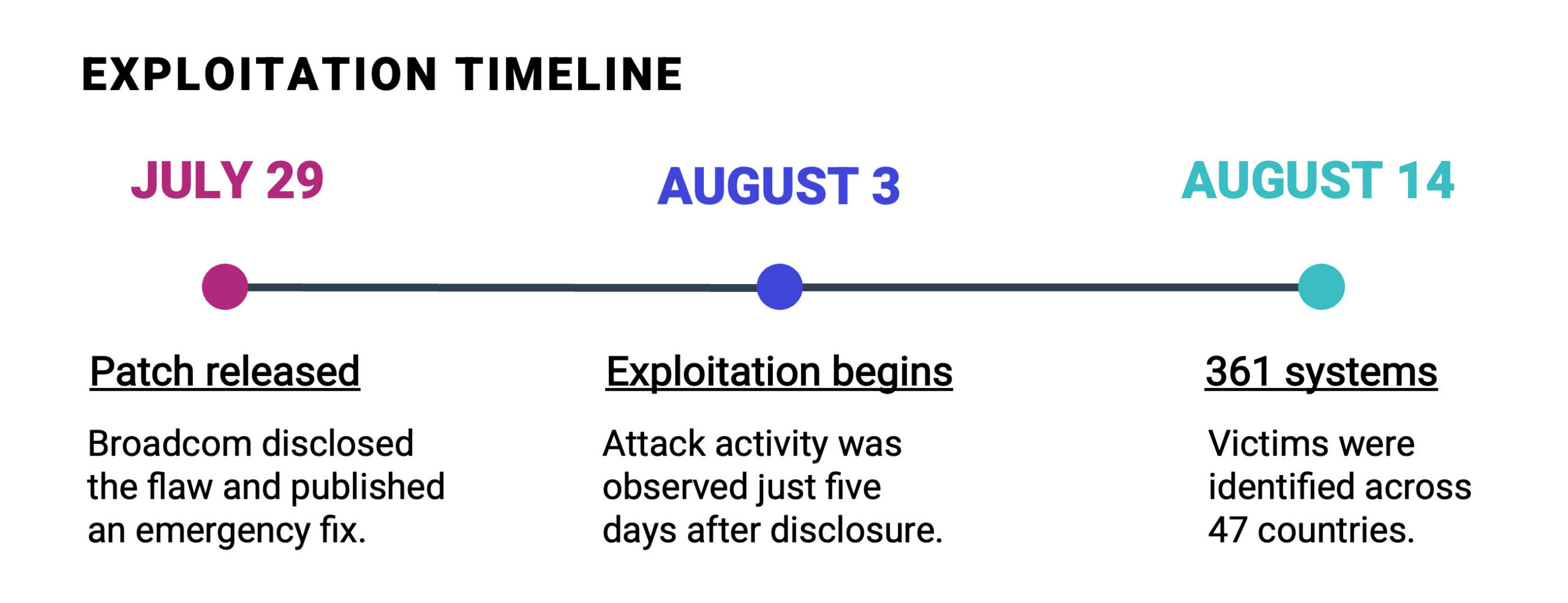
A Patch Existed. The Risk Gap Still Won.
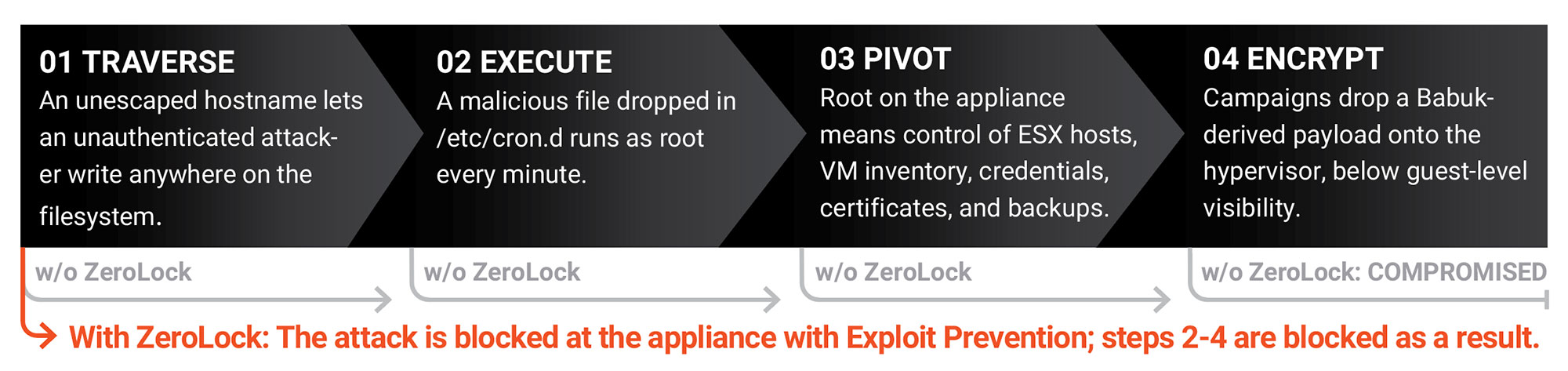
CVE-2026-59310 is a directory traversal flaw in the vCenter Syslog Server that gives an unauthenticated attacker remote code execution as root. It’s rated CVSS 9.8, and the advisory (VMSA-2026-0006.1) lists no workaround.
How the Attack Works
Preempt
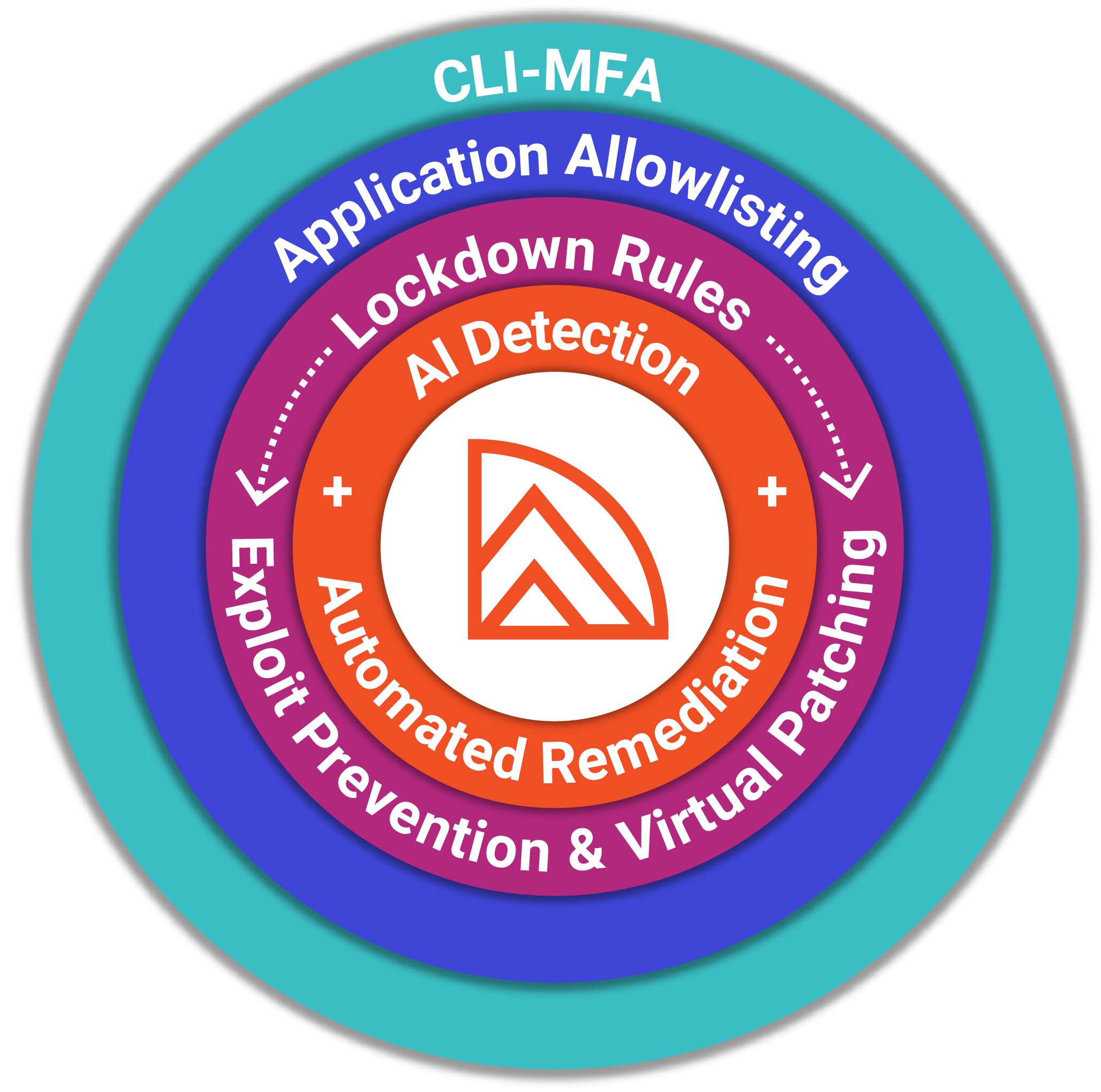
Stop attacks before they have a name.
Traditional defenses are reactive, waiting for a patch or an alert, and by then the attacker already has the keys to the infrastructure. ZeroLock enforces prevention at the control plane itself, protecting the vCenter appliance before a CVE is ever assigned a number.
Exploit Prevention & Virtual Patching
Lockdown Rules
Application Allowlisting
CLI-MFA on Appliance Shell Access
Data Exfiltration & File Access Prevention
Canary Files & Anti-tampering
Protect
Ensure business continuity when the console is the target.
With AI-driven attacks continuing to evolve, resilience matters as much as prevention. Patented AI detection and automated remediation catch malware implants, log tampering, and suspicious hypervisor access in real time, then remove malicious files and restore altered data in seconds, keeping the brain of the operation running under attack.
Ransomware & Wiperware Protection
Real-time Remediation & Automated File Rollback
Attacker Persistence Removal
Process Tree Visibility
Perform
Built for how your team works.
ZeroLock installs onto vCenter in one line and runs as a single lightweight agent with no kernel modules. Detection is behavioral, so there are no signatures to chase, and every event is available to the SIEM and SOAR tools you already run.
Lightweight
Rapid Deployment
Built to Keep vCenter Running
Built into Your SOC
Supported Versions
A note on vendor support: Broadcom does not currently support third-party software installed on vCenter. If you ever need to open a vCenter support case, ZeroLock removes with a one-click uninstall and reinstalls afterward with a single line.
Cover the Hosts, Too
vCenter is the control room, and your hypervisors are the core. Pair ZeroLock for vCenter with ZeroLock for hypervisors for defense-in-depth across your entire virtual infrastructure.
TECH SPECS
ZeroLock® Agent Requirements for vCenter
OS
Processor
Footprint
Memory: 50MB; Disk Space: 100MB
Kernel Mods
No kernel modification or modules required
Installation Methods
- One-line, web-based deployment (Wget)
- File-based deployment (Tar.gz or Bash)
Footprint & Cores
RAM: 16GB; Disk Space: 128GB; 6 or more CPU cores recommended
Installation Reqs.
- Self-deployment: Latest version of Docker installed
- OVA-deployment: ESXi 7.0 or later
Documentation
Existing integrations
- SIEM: Splunk, Sumo Logic, Elastic, Google SecOps, CrowdStrike Next-Gen
- SOAR: Swimlane
- Incident API: Veeam
Protect the Control Room Before the Next Attack
One compromise of vCenter reaches every host it manages. ZeroLock stops attacks at the appliance, catches what can get past, and undoes the damage before it becomes an incident.
Integrated with